Category: Shopping

  • How Usability and Accessibility Design Works For Everyone

    In today’s digital world, a website is one of the first impression someone has with a brand. It could be a visitor shopping online, reading a blog (like you’re doing now), or researching their answer. All in all, these user experiences matter. Usability and accessibility are often used together in building a successful website design, but its important to remember that they are not the same. Understanding the difference between usability and accessibility will dramatically change results om how viewers can interact with your website.

    Design for a website is more than the creative gear towards making it look nice, it helps others with those who take in content differently and make it easier to navigate your content. We will explore what usability and accessibility is, the difference, and why they’re essential to web design.

    What is Usability?

    Usability means how easy and efficient your website is to use. A website that is usable allows visitors to navigate and complete tasks without confusion.

    Elements of a good usability include:

    • Clear and easy navigation menus
    • Readable fonts
    • Page Layout that is not confusing and easy to navigate
    • Consistency with design and layout

    When usability is done right, users don’t have to put a lot of effort into how to use your website. When it is done poorly, users can become frustrated and not want to visit your website at all. Which creates overall distrust within your website.

    Primary keyword: website usability

    Secondary keyword: web usability, navigation

    What is Accessibility?

    Accessibility focuses on making websites easier to take in for people with all abilities, including visual, auditory, motor or cognitive disabilities. When a website is accessible, it ensures that everyone even those with disabilities can see, understand and navigate your digital content.

    For example:

    • a website might be usable with a clean navigation but still be inaccessible due to the images having lack of alt text.
    • a site may be accessible but a site that is poorly organized makes it difficult for visitors to navigate the website.

    The best websites prioritize both usability and accessibility to create a smooth experience for everyone.

    Why Do They Matter?

    1. Better User Experience
      • A website that is easier to navigate and use are more likely to keep their users on their site longer. This builds overall positive experience with their brand welcoming them to trust the brand.
    2. Improved SEO Performance
      • Search engines favor websites that are well structured, readable, and accessible. When websites for alt text for images, clear headings and descriptive link text it helps improve the ranking of your website on the search engine.
    3. It’s Required by Law and It’s Ethical
      • Many countries have laws and guidelines requiring digital accessibility.
    4. Increased Reach
      • Accessible websites can increase audience views. Including users with disabilities, older adults, and people using mobile devices in certain areas

    Best Practices for Improving Usability and Accessibility

    Here are a few helpful tips to help improve usability and accessibility.

    • Use descriptive link text instead of vague phrases
    • Adding alternative text to images
    • Test your site accessibility using evaluation tools online
    • Make navigation easy and simple.

    Image Use and Alternative Text

    Its proven that images can enhance a blog post, but its important to understand how to use them correctly. They must include descriptive alternative text so those who are screen readers can understand what it is.

    Example image suggestions with alternative text:

    • Image of a dog with a yellow collar
    Alt text: young black lab wearing a yellow collar on a orange marble ground, dog is sitting nicely behind a green plant
    • A compare and contrast drawing of DNA vs. RNA
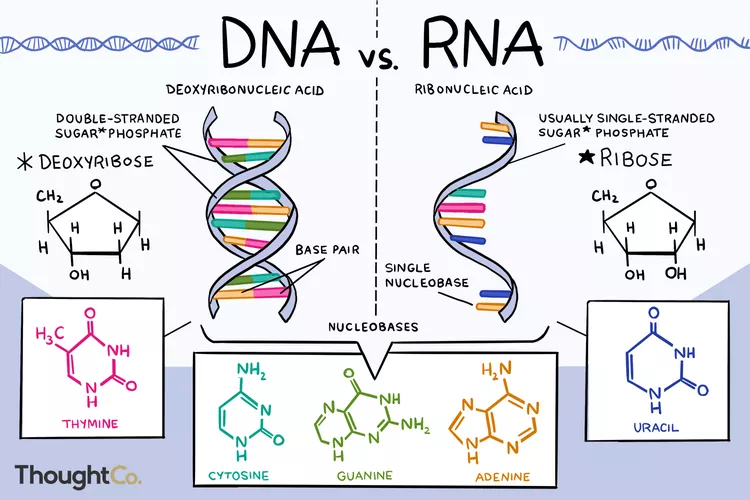
    Alt text: a compare and contrast drawing showcasing the differences of DNA and RNA

    Including alternative text improves accessibility to your website and helps search engines understand the visual content.

    Conclusion

    Usability and accessibility are essential for effective web design. While usability ensures a website is efficient, accessibility guarantees that everyone- regardless of ability- can access and interact with digital content. Together, they create a better and useful experience for users, improve SEO searches and promote inclusivity.

    By prioritizing usability and accessibility within your website, designers and content creators can build websites that are not only functional but welcoming to all abilities. These two components are not considered optional, but rather considered essential.

    Here are some more essential tips to elevate your websites usability and accessibility.

    https://www.levelaccess.com/blog/usability-vs-accessibility/

    https://www.sheribyrnehaber.com/accessibility-and-usability/

  • How To Thrift Like a Pro (And Actually Enjoy It)

    woman with ginger curly hair in a thrift shop looking through clothes on the racks
    Woman Shop” by Burst/ CC0 1.0

    Thrift stores have been around for ages. There are people that are no strangers to
    walking into a thrift store and feeling confident that they can walk out finding pieces that
    they love to their wardrobe. It is important to remember though; they never started as a
    good thrifter, they have lots of practice, tips and dedication under their belts. Thrifting has
    grown in recent years due to social media and social media influences. It allows shoppers
    to find more unique pieces with a treasure hunt involved. With sustainability being more of
    a bigger conversation, thrifting offers clothing without the mass production of sweatshops
    along with the fields of wasteland. In this article, we will teach you tips and tricks to enjoy
    the experience of thrifting more as well as finding the best pieces to take home with you.

    Prepare Before Your Trip


    It’s important to note that thrift stores are not as organized and nicely merchandised
    as other retail stores. The importance of thrifting: hunting! So, it is important to be prepared
    for the treasure hunt. One of our favorite tips is to know the inspiration you are looking for. We recommend
    saving a mood board or saving your favorite inspiration. This will help you keep in mind the
    pieces you are looking for as well as staying organized while looking through the chaos.

    Another useful tip to use to help you prepare for your trip is to wear clothes that can
    easily be tried on over. This could be a tank top and leggings for example. Not all thrift
    stores offer accommodation of dressing rooms. With clothing that can easily be tried on
    over can allow you to visually see how clothes look on your body. This can be useful for
    bottoms and shirts that might seem a little too big or snug.

    Where to Thrift


    Thrifting opportunities go beyond traditional charity shops. Local thrift stores
    usually offer lower prices and more unique finds. Consignment shops usually carry more
    curated styles which put them at a higher price point. Flea markets are great to support
    local business and find unique jewelry.

    Each location has its advantages. Thrift stores require more patients and digging
    while curated shops save time but has a higher price tag. Exploring different places to
    source increases the chances of finding pieces that you’ll love.

    How to Spot Quality Pieces


    Learning how to identify quality pieces is one of the most valuable skillsets to have
    in thrifting. Start by inspecting stains, holes or damages. Remember that some flaws can
    be fixed, but others might require a bigger project. Making sure the garment is in tacked is number one priority.

    different types of flannel fabric
    Plaid Fabric” by Seacoast Sage/ CC0 1.0

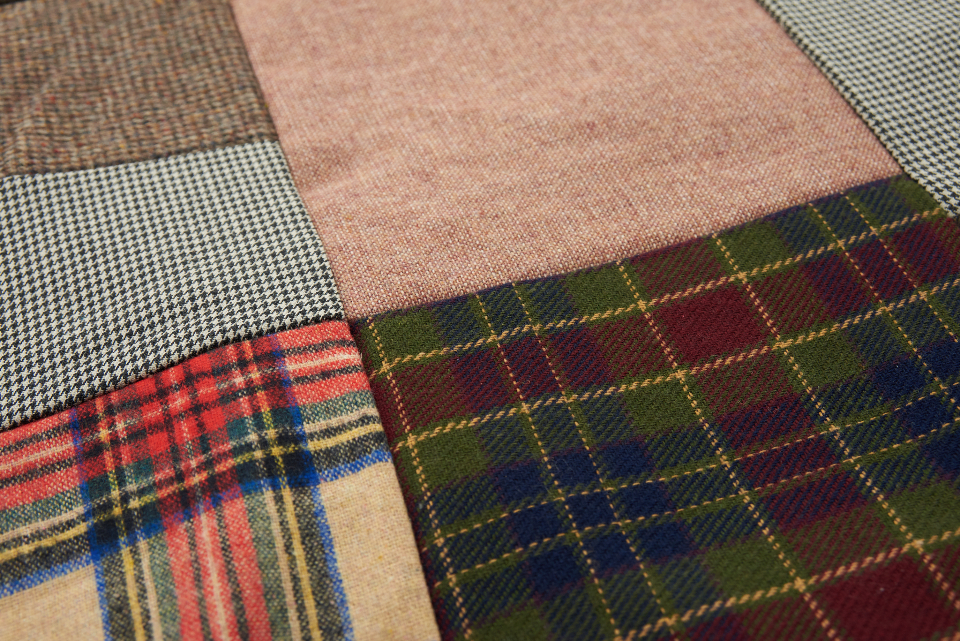
    Next check the fabric, natural fibers such as cotton, wool and silk typically age
    better over time than synthetic fabric. Also remember that if you truly like the piece, get it!

    Thrifting with Intention


    Buying something out of impulse is an easy habit to fall into when shopping at a
    thrift store. Shopping with intention means shopping within the means of your lifestyle and
    personal style. It is easy to fall into the habit of impulse buying simply because it is
    inexpensive. Ask yourself if you really need it and if the item can be styled within your
    wardrobe.

    Trends can be fun to explore when you are thrifting, but balancing trendy pieces with
    staples that are timeless is what makes a wardrobe last. Relying on trends can result to
    overconsumption, shopping with intentions add true value to your closet.

    Budgeting and Value


    The biggest advantage of thrifting is affordability, but like the previous tip price alone
    should not dictate the purchase. Using a cost per-wear mindset helps determine whether a
    piece is truly worth possessing.

    It is also important to know when you need to factor other additional costs such as
    tailoring or repairs. Sometimes paying for a higher quality used item results in thrifting
    results in a higher long-term value.

    Sustainability and Ethical Fashion


    In environmental terms of thrifting, it has played a big role in reducing the impact of
    the fashion industry. When shoppers buy secondhand clothing, it helps extend the life
    cycle and reduce the demand for new fashion. Not only that, it also supports local
    communities and smaller businesses, making it a socially conscious choice.

    When choosing secondhand fashion, it’s a simple way to impact a more ethical
    shopping experience while also maintaining a sense of individuality.

    So What Now?


    Thrifting is not just about saving money. It enhances creativity, style, sustainability
    and intentional shopping. With having the right mindset and being prepared, thrifting will
    naturally become a rewarding way to build personal style within your wardrobe. Focusing
    on quality, versatility and value anyone can walk into the thrift store with confidence.

    So go ahead and get thrifting! Remember, slow down, take your time and enjoy the
    treasure hunt. The best finds are often the ones you least expect.

    If you want to learn more or dive deeper into tricks and tips for thrifting, check out these links!

    https://www.thesorrygirls.com/lifestyle/the-secret-to-thrifting